For decades, we have been told to create longer passwords, combine uppercase and lowercase letters, add numbers and special characters, and avoid anything easy to guess. The message was simple: the more complex your password, the harder it is for hackers to crack.
Yet today, millions of people unlock their smartphones, laptops, and other devices with a four-digit PIN.
That raises an interesting question: If a hacker can try every possible four-digit PIN, why is such a short code considered secure when online accounts often recommend a long, complicated password?
At first glance, it seems like a step backwards in cybersecurity. A four-digit PIN has only 10,000 possible combinations, from 0000 to 9999. A computer can test that many combinations very quickly if it has unrestricted access to the verification process.
So why do device manufacturers allow such short codes?
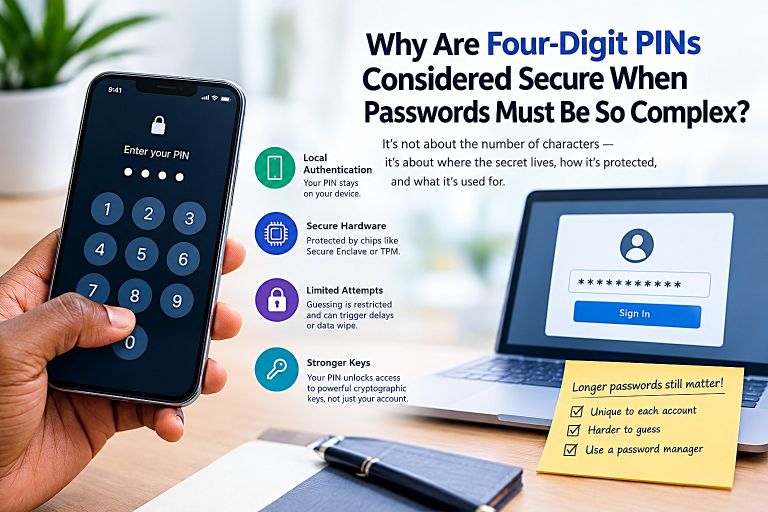
The answer is not that four digits have suddenly become more powerful than a long password. The real explanation is that modern security depends on more than the secret you remember. It also depends on where that secret is checked, what it protects, and how difficult an attacker can make repeated guesses work.
1. The Old Problem: Protecting Passwords Used Online
Consider what happens when you sign in to a website using a username and password.
You enter your credentials, and your device sends the necessary authentication information to the website over an encrypted connection. The website’s server checks whether the password is correct, usually by comparing a derived value against a securely stored password hash.
Encryption protects information in transit, while secure password storage helps protect credentials if a database is stolen. However, neither measure eliminates every risk.
Attackers may attempt to guess passwords through a website, exploit weaknesses in its login protections, steal credentials through phishing, or obtain password databases and attempt to crack their hashes offline.
Offline attacks are particularly important. If criminals steal password hashes, they may be able to test guesses on their own computers without interacting with the original website. Their speed depends on the hashing algorithm, its configuration and the hardware available to them.
This is why a weak or reused password can be dangerous. If an attacker discovers it, the consequences may extend beyond one account.
A long, unique password makes guessing more difficult, while protections such as rate limiting, secure password hashing and multifactor authentication make attacks harder still.
But device PINs work differently.
2. A Device PIN Is Not the Same as an Online Password
When you enter a PIN to unlock your smartphone, you are generally not sending that PIN to your bank, email provider or social media platform.
Instead, the PIN is checked locally by the device’s operating system and associated security mechanisms. Depending on the device, it may help unlock access to encryption keys or authorize the use of credentials stored on the device.
In other words, the PIN is often a local unlocking secret, not the credential that an online service uses to identify you.
Imagine that your phone contains a secure digital wallet. The wallet has cryptographic keys that can prove your identity to supported services. Your PIN helps unlock access to those keys, but it is not itself the key used to authenticate with every service.
This distinction is crucial.
A PIN that is safe enough to unlock a protected device is not necessarily safe enough to serve as the sole password for an internet-facing account.
3. Why 10,000 Combinations Are Not Always Enough for an Attack
Let’s return to the four-digit PIN.
There are exactly 10,000 possible combinations if leading zeroes are allowed. If every combination is equally likely, an attacker who can test guesses without restrictions would need an average of approximately 5,000 attempts to find the correct PIN.
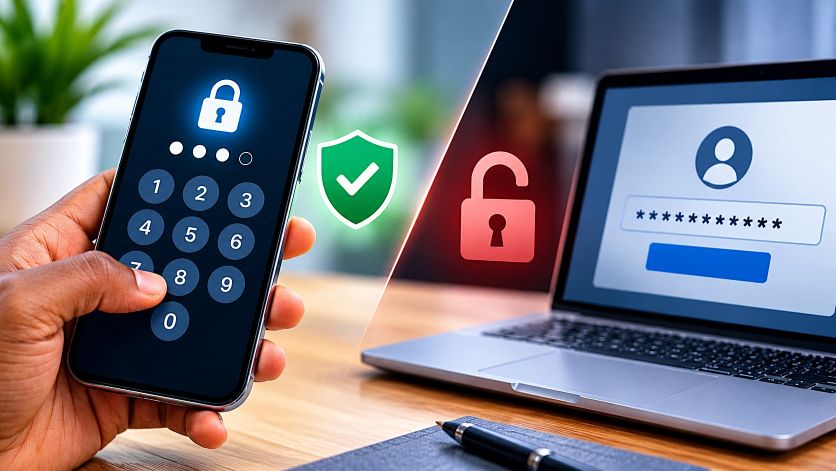
That is a small search space for a computer.
However, the calculation assumes that the attacker can keep guessing freely. Secure devices are specifically designed to make that assumption false.
Depending on the device and its configuration, security controls may include:
- Limiting consecutive incorrect attempts.
- Introducing delays or increasing restrictions after failed attempts.
- Disabling an authentication method until recovery or another verification step is completed.
- Protecting sensitive operations using dedicated hardware or an isolated security environment.
- Encrypting stored data so that removing the storage chip does not automatically reveal its contents.
These safeguards change the practical situation. An attacker may know that the correct PIN is one of 10,000 possibilities, but that knowledge does not mean they can test every possibility.
For example, if a system permits only a small number of attempts before disabling the relevant authentication method, trying all 10,000 combinations may be impractical or impossible without finding a separate vulnerability.
The security comes not from the PIN’s complexity alone, but from limiting the opportunities to guess it.
It is important to note that delays, attempt limits and data-wiping policies vary. Not every phone automatically erases itself after ten failed attempts, and not every device uses identical security mechanisms.
4. The Role of Secure Hardware
Modern smartphones and computers often use hardware-assisted security to protect sensitive information.
Examples include Apple’s Secure Enclave and computers equipped with a Trusted Platform Module (TPM). These technologies are not identical, but both can contribute to protecting cryptographic material and sensitive security operations.
A TPM can protect keys and perform certain cryptographic operations. Apple’s Secure Enclave provides an isolated environment for sensitive security functions on supported devices.
Depending on the platform, other protections may include a trusted execution environment, secure boot, hardware-backed encryption, and operating-system controls.
The PIN does not necessarily unlock a single 256-bit key sitting inside a chip. Real implementations are more sophisticated. The PIN may be checked by the operating system or a protected component, and successful verification may permit access to keys or encrypted data.
Why does this matter?
Because an attacker who steals a phone does not automatically gain the ability to test PINs at unlimited speed. The security architecture is intended to prevent straightforward bypasses and make repeated guessing difficult.
However, hardware protection is not magic. Its effectiveness depends on the device, software, configuration, and the attacker’s capabilities. Security vulnerabilities, weak implementations, or access to an already-unlocked device can change the outcome.
5. Does the PIN itself Create a 256-Bit Security Barrier?
This is one of the most common misunderstandings about device security.
A cryptographic key may be 256 bits long, but that does not mean a four-digit PIN has become a 256-bit secret.
A four-digit PIN still has only 10,000 possible values. A randomly selected 256-bit key, by contrast, has (2^{256}) possible values.
The difference is enormous.
The purpose of the PIN is generally to control access to a stronger cryptographic mechanism. The device’s security design helps prevent an attacker from bypassing the PIN check or repeatedly testing guesses against the protected secret.
Think of it as a locked vault. The vault may contain something extremely difficult to reproduce, but the lock is only useful if it resists tampering and prevents unlimited attempts. A short combination can be practical when the lock is engineered to enforce those restrictions.
The vault analogy has limits, of course: real devices use cryptography, software and hardware protections rather than a simple mechanical lock.
The central principle remains the same: a strong cryptographic key and a short PIN perform different jobs.
6. So How Does Your Phone Authenticate You to a Bank?
Unlocking your phone and authenticating to your bank are two separate operations, even when they work together seamlessly.
Suppose you open your banking app using your fingerprint or phone PIN. The exact process depends on the bank, operating system and app.
The PIN may simply unlock the phone. Alternatively, a biometric check or device credential may authorize the app to use a protected cryptographic key. In some systems, that key can then help authenticate you or authorize a particular action.
The bank does not ordinarily receive your phone’s local unlock PIN merely because you entered it.
Instead, the app may use a separate login session, a password, a one-time code, a device-bound credential or a cryptographic authentication protocol. The bank verifies the relevant evidence according to its own security system.
This is especially important for passkeys.
A passkey uses public-key cryptography. The service stores a public key, while the corresponding private key remains protected by the user’s authenticator or credential provider. When signing in, the authenticator uses the private key to produce a cryptographic response that the service can verify.
A PIN or biometric may be used locally to authorize that operation. The service verifies the cryptographic response, not the PIN itself.
This approach can help protect against phishing because the authentication is tied to the legitimate service rather than relying solely on a password that a criminal might trick the user into revealing.
However, not every banking app uses passkeys, and not every four-digit banking PIN works this way. Some PINs are verified by the bank or used in other authentication arrangements. Their security depends on the specific system.
7. Why Longer Passwords Still Matter
None of this means long passwords are obsolete.
A four-digit PIN has a theoretical maximum of about 13.3 bits of entropy when all 10,000 combinations are equally likely. In practice, people often choose predictable numbers such as 1234, 0000 or dates, which makes some PINs easier to guess than others.
A sufficiently random 15-character password drawn from a large character set can have vastly more possible combinations.
The difference is that a PIN used locally on a protected device operates within a different security environment from a password used as the primary credential for an online account.
A strong online password should be unique to each account. A password manager can generate and store long, random passwords so that you do not have to remember all of them.
Online services must also use appropriate password-storage and login protections. Long passwords alone cannot prevent phishing, malware, credential theft or attacks against weak recovery processes.
Current guidance from the US National Institute of Standards and Technology (NIST) distinguishes between centrally verified passwords and local activation secrets used to unlock cryptographic authenticators. It also emphasizes protections such as rate limiting and secure authenticator design rather than relying on complexity rules alone.
The lesson is not to replace every password with a four-digit PIN. It is to use the right authentication method for the right purpose.
8. What Happens If Someone Steals Your Phone?
Physical possession does not automatically mean an attacker can unlock a modern phone, but it introduces risks that do not exist in the same way when someone is simply guessing at a remote login page.
An attacker might try common PINs, observe the code as it is entered, exploit a software vulnerability or take advantage of a phone that is already unlocked.
They might also target account recovery, a connected email account, a SIM card or a banking session that remains active.
The strength of the device PIN is therefore only one part of the overall security picture.
To reduce your risk:
- Use a longer PIN if your device supports it and you can remember it securely.
- Avoid birthdays, repeated digits and predictable sequences.
- Set a short automatic screen-lock period.
- Keep your phone’s operating system and apps updated.
- Enable the manufacturer’s available theft-protection and remote-locking features.
- Protect your banking and email accounts with unique passwords and multifactor authentication where available.
- Never share your PIN or enter it where someone can easily watch you.
- Review your bank’s security settings and notification options.
For sensitive accounts, remember that a stolen phone can create risks even if the attacker never discovers the device PIN. A secure account recovery process and prompt reporting of a lost device are also important.
9. The Real Evolution of Authentication
The history of passwords is not simply a story of increasingly long strings being replaced by shorter ones.
Security has gradually moved towards systems that combine different protections: cryptography, hardware-backed credentials, biometric verification, device possession, secure recovery and stronger resistance to phishing.
A PIN is easy to remember and quick to enter. A cryptographic key can be extremely difficult to forge. Hardware and software controls help protect the key from unauthorized use. When these components are designed well, they can work together to provide strong authentication without requiring users to memorize a long password every time they unlock a device.
That is the important shift: security is increasingly designed around the entire authentication system, rather than the apparent complexity of one secret.
Conclusion: Four Digits Can Be Enough, but Not Everywhere
Why can a four-digit PIN be acceptable for unlocking a smartphone when online accounts often require longer passwords?
Because a device PIN is usually checked locally and can be protected by attempt limits, encryption and hardware-assisted security. It serves as a gateway to protected information or credentials rather than necessarily acting as the secret sent to an online service.
But four digits are not inherently stronger than a long password. If an attacker can test PINs without restriction, 10,000 possibilities are not a meaningful barrier. If a PIN is used as the sole credential for an internet-facing account without adequate protections, it is generally far too weak.
The real achievement of modern authentication is not that short secrets have become unbreakable. It is that well-designed systems can make those secrets useful without giving attackers unlimited chances to guess them.
In cybersecurity, the strength or complexity of a secret matters. But so do the system that protects it, the way it is used, and the opportunities an attacker has to defeat it.